
Play free snooker on Android and iPhone.
Open Snooker Rivals in a compatible mobile browser and play on your phone. Browser play is available now, with no app download required. You can share online matches with players on phones and computers.
Start in your mobile browser
Visit snookerrivals.com in Chrome on Android or Safari on iPhone, then select Play for Free. You can try the game as a guest. A free account lets you choose a username and flag, add friends and keep your recorded online progress.
Choose Online Play and Pick up matches, then Free Entry for matches without a coin entry. You can also create a free table or practise on your own. Cosmetic items and currency packs are optional purchases; they are not required to open a free table.
Portrait or landscape
The game supports both orientations. Landscape gives a wider view of the table. Portrait can make the action and controls easier to see on a small display. Try both and use the view that feels comfortable. Camera controls let you change how you look at the table during play.
Aim, choose power and strike
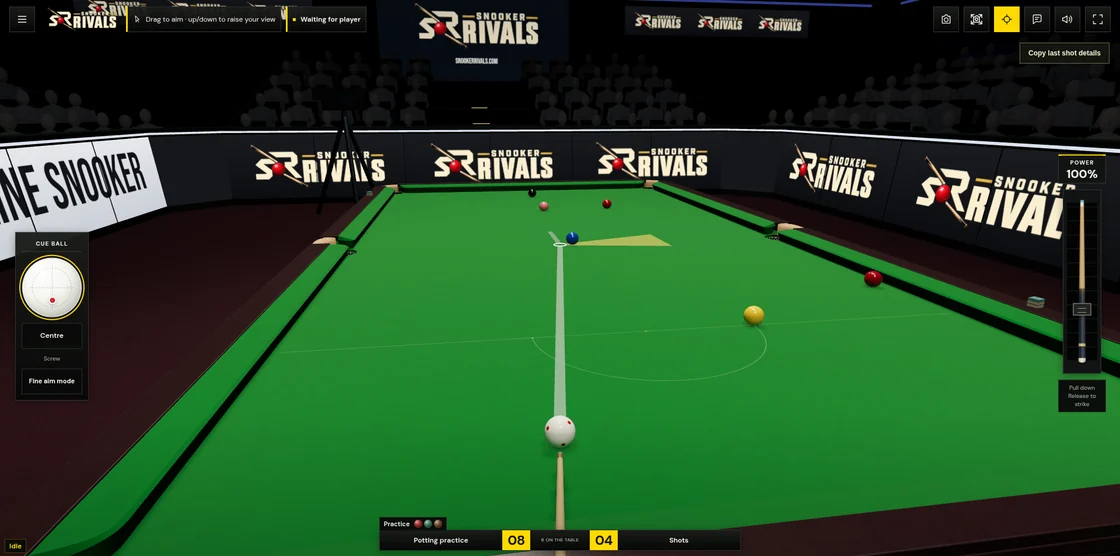
In Player view, drag left or right behind the white ball to adjust your aim. Drag up or down to change the height of your view. Switch to the overhead camera to inspect the table and plan your next shot.
Pull the cue control down to build shot power, then release to strike. Move it back up before releasing to cancel. Let the balls settle before attempting the next shot. You can use separate fingers to aim, pull the cue and adjust spin.
Control the white ball
The cue-ball control sets where the cue strikes the white. Above centre applies follow, below centre applies screw, and the sides add side spin. Return the marker to the centre for a central strike. Power and spin affect the position you leave for your next shot.
More space on iPhone
You can keep playing in Safari. To open the game without Safari's normal address bar and tabs, open the Share menu, select Add to Home Screen, enable Open as Web App if your iPhone shows that option, and add the icon. Launch Snooker Rivals from that icon. This is an optional browser installation, separate from an App Store release.
Invite a friend on another device
Create a private table and share its invitation link or room code. Android, iPhone and PC players can join the same online game. Follow the friends guide for room setup and invitations.
Connection and app availability
Online matches need an internet connection. Load the game while connected before attempting local practice; offline availability depends on the resources your browser has cached. The Google Play release is still being prepared. You can use the mobile website while it is in development.
Read How to Play for scoring, fouls and more controls, or contact Support if you find an alpha issue. Include your phone model, browser and what happened.